AI Agent for Automated LinkedIn Content Publishing
AI Automation lab project using n8n by building an AI-powered LinkedIn Content Publishing Agent.
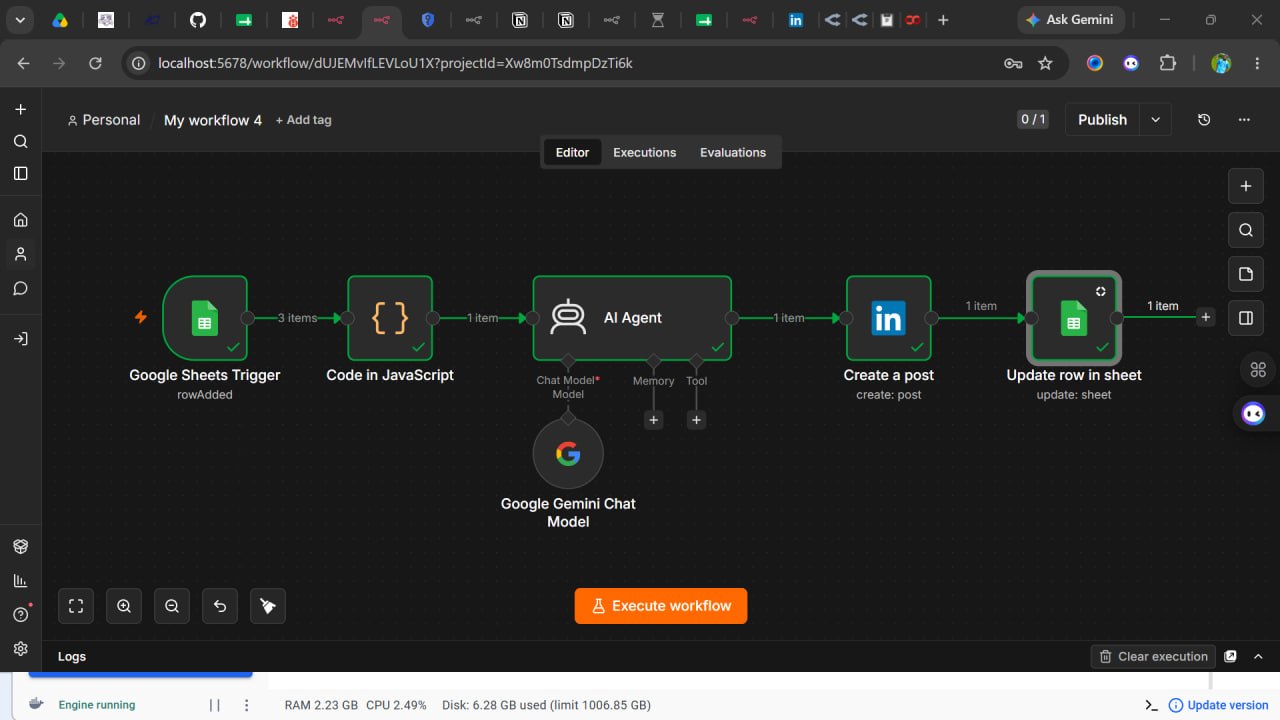
Problem Many professionals and businesses spend significant time creating, reviewing, and manually publishing LinkedIn content. This repetitive process reduces productivity and lacks a centralized way to track published posts. The goal of this project was to build an AI-powered workflow that automates content generation, publishes posts to LinkedIn, and records the publishing status automatically.
During development, several technical challenges were encountered: • Unstable internet connection interrupted installation, testing, and API communication.
• The local n8n instance failed because the installed version had expired, requiring a restart and update through Docker.
• The initial AI model (OpenAI) could not generate content because the available free API credits had been exhausted.
• LinkedIn API authentication failed due to insufficient permissions and OAuth configuration, preventing automatic publishing.
Process
-
Created a Google Sheets spreadsheet to serve as the trigger and content source.
-
Configured a Google Sheets Trigger node to monitor newly added rows.
-
Added a JavaScript Code node to clean, validate, and prepare the incoming data.
-
Connected an AI Agent to generate professional LinkedIn posts from the spreadsheet input.
-
Replaced the OpenAI model with Google Gemini after discovering the OpenAI API quota had been exhausted.
-
Configured the LinkedIn Create Post node for automatic publishing.
-
Resolved LinkedIn authentication issues by: • Creating a LinkedIn demo page. • Setting up a LinkedIn Developer application. • Configuring Custom OAuth2 credentials in n8n. • Granting the required LinkedIn API permissions. • Successfully connecting the LinkedIn account.
-
Added an Update Row node to mark completed posts in Google Sheets.
-
Tested the workflow end-to-end, verified successful execution, and corrected any remaining configuration errors.
Lessons Learned: • AI automation projects involve much more than connecting nodes. Understanding APIs, authentication, and integrations is equally important.
• Docker is an essential tool for managing and maintaining local n8n environments.
• AI workflows should be designed with flexibility, making it easy to switch between language models such as OpenAI and Google Gemini when needed.
• OAuth 2.0 authentication is a critical skill for integrating third-party platforms like LinkedIn.
• Systematic debugging helps identify and resolve issues faster than making random configuration changes.
• Building resilient workflows requires planning for common failures such as API limits, expired services, and network interruptions.
Hands-on projects provide practical experience that strengthens problem-solving, automation design, and confidence in deploying real-world AI solutions.